MyStats BBall1.1
Publisher Description
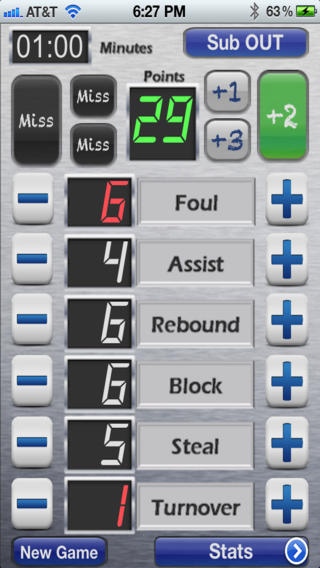
From the makers of BBall Stats+ comes the ultimate companion App for keeping personal stats. If you are a parent looking for an app to track your son or daughters basketball progress, or a scout tracking the latest recruit, this apps for you. MyStats BBall is the ultimate app for easily keeping a basketball player s stats like a pro.
Did i say pro?
Yes, like a professional stat keeper, you can use MyStats BBall to track your favorite pro player, college prospect or local hoopster. Keep stats for every game and overall averages.
So what can you do with it?
MyStats BBall lets you track all the stats recorded by BBall Stats+ PLUS many more including Minutes Played and Shot Percentages. All this using simple, intuitive and easy to use screens.
Here is a detailed list of what MyStats BBall will do:
Features
=======
Tracks statistics for single player at a time.
Create multiple player profiles
Add a photo picture to profiles
Track overall player stats
Track individual game stats
Email stats in PDF format
Landscape view to make adjustments and see details
*NOTE: There are two primary views. Portrait for the stats screens and Landscape for the Adjustment screen. Rotate the device to switch between the views.
Stats tracked include:
=============
PTS = Total Points
GP = Games Played
MIN = Minutes Played
PPG = Points Per Game
EEF* = Efficiency
MPG = Minutes Per Game
FG = Field Goals
MFG = Missed Field Goals
FGG = Field Goals Per Game
FG % = Field Goal %
FT = Free Throws
FTG = Free Throws per Game
MFT = Missed Free Throws
FT % = Free Throw %
FGG3 = 3pt Field Goals per Game
FG3 = 3pt Field Goals
FG3 % = 3pt Field Goal %
MFG3 = Missed 3pt Field Goals
APG = Assists per Game
AST = Assists
RPG = Rebounds per Game
REB = Rebounds
BPG = Blocks per Game
BLK = Blocks
SPG = Steals per Game
STL = Steals
TOA = Turnover Avg
TOV = Turnovers
PFA = Personal Foul Avg
PF = Personal Fouls
*EFF Formula = [(Pts+Reb+Ast+Blk+Stl) (Missed FG+Missed FT+TO)] / Games Played
Purchase MyStats BBall and you won t be disappointed. We aim to be the best so don t hesitate to send us your ideas of what you would like to see in our apps.
MyStats BBall is part of a suite of apps devoted to basketball Dads, Moms, Coaches and enthusiasts. Check out our support website for more apps, more details and more screen shots.
www.HOLTECPro.com
Requires iOS 5.0 or later. Compatible with iPhone, iPad, and iPod touch.
About MyStats BBall
The company that develops MyStats BBall is HOLTEC, LLC. The latest version released by its developer is 1.1.
To install MyStats BBall on your iOS device, just click the green Continue To App button above to start the installation process. The app is listed on our website since 2012-01-28 and was downloaded 10 times. We have already checked if the download link is safe, however for your own protection we recommend that you scan the downloaded app with your antivirus. Your antivirus may detect the MyStats BBall as malware if the download link is broken.
How to install MyStats BBall on your iOS device:
- Click on the Continue To App button on our website. This will redirect you to the App Store.
- Once the MyStats BBall is shown in the iTunes listing of your iOS device, you can start its download and installation. Tap on the GET button to the right of the app to start downloading it.
- If you are not logged-in the iOS appstore app, you'll be prompted for your your Apple ID and/or password.
- After MyStats BBall is downloaded, you'll see an INSTALL button to the right. Tap on it to start the actual installation of the iOS app.
- Once installation is finished you can tap on the OPEN button to start it. Its icon will also be added to your device home screen.
